3/23/2024 : A short investigation into Entra Enterprise Applications
I have recently seen several cases where users have either A. had their email compromised and then registered an application, or B. registered an application that was provided via a phishing email. I wanted to understand why the registration would be useful from an attacker perspective. I got a ton of help on this topic from reading this TrustedSec blog as well as this blog from Katy’s Tech Blog.
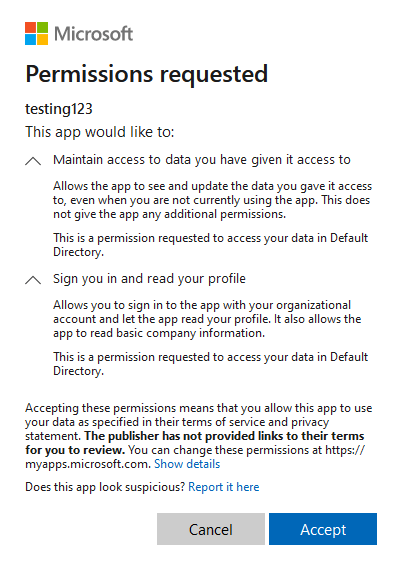
So, lets start off with a quick background on Entra Enterprise Applications. By default Entra users have the ability to “Register” an application within the Entra tenant. A common example of this is tools like Grammerly which users can add as plugins to Outlook. The way this works is that a user will navigate to webpage owned by the tool that they are trying to use. The page will then redirect them to a legitimate Microsoft page which will display the name of the tool as well as a list of permissions that it will want access to. The user will then have the ability to accept the request or cancel. The page will appear similar to the one shown below. Once a user clicks accept or “Consents” to the application, that application now will have the ability to access the tenant with the rights that had been approved by the user.
This is no big deal if it is a legitimate application from a reputable company. However, what harm can this cause if it is being leverage by a threat actor? As I said before, consenting to an application is essentially the same as allowing the application to function with the permissions of the user who consented. To test this out, I used Katy’s blog post mentioned at the top of this post to setup my own malicious application. This process involves setting up a simple web server that will hold a SQL database, a front-end webpage, and a list of permissions that our application will need from the user.
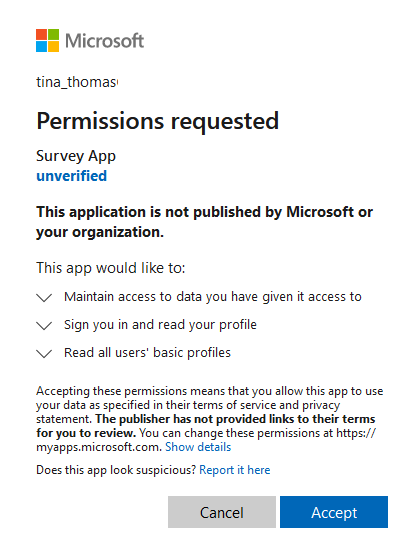
For our first example we will assume that the threat actor has created a multi-tenant application named Survey App, and sent an invitation to the application to a user named Tina at Contoso. Tina clicks on the invitation and is greeted with the screen below. Tina believes that she is installing an application that will increase her productivity by 400 percent so she goes ahead and clicks the “Accept” button.
As soon as Tina clicks “Accept”, the malicious application will then utilize the permissions that were granted to it by Tina to pull a list of all of the users within the domain as shown below (this permission is enabled by default in Entra, I will show how to disable it at the end of this post) and sends them back to the threat actors machine.
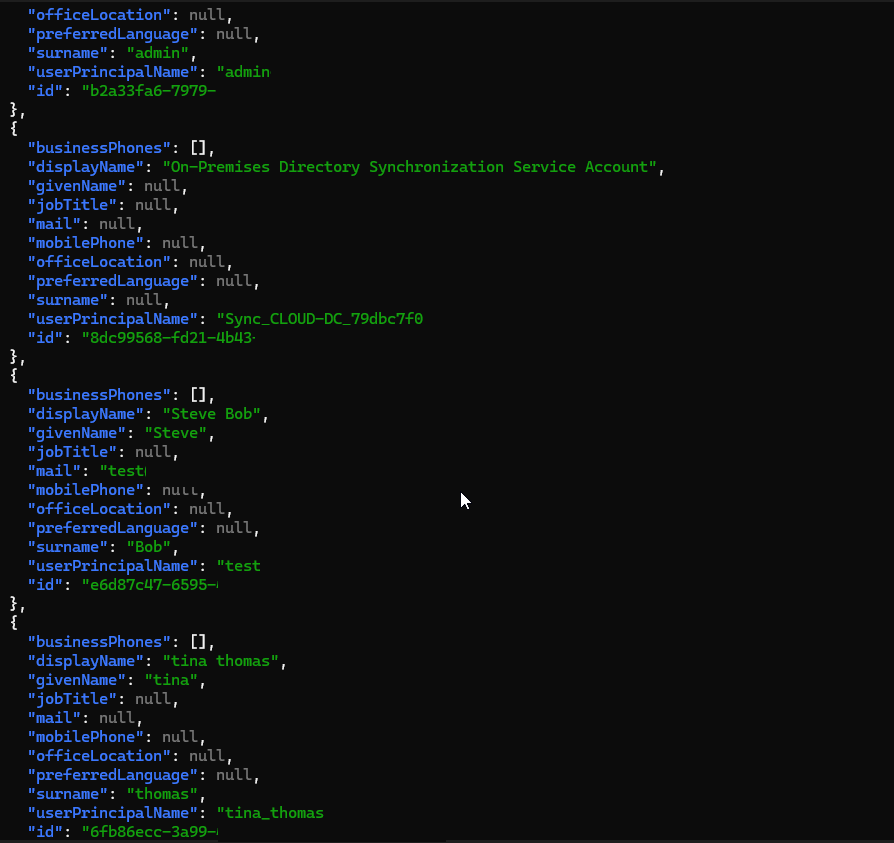
One thing to note about the Survey App that Tina consented to is that it shows up as an “Unverified” application. So let’s take a quick detour to clarify what this means. When an application is “Unverified” by Microsoft it means that this application could have been created by anyone that has an Azure tenant. Thankfully, Microsoft helps us out a little bit by limiting the amount of permissions that an unverified application can request from a user (offline_access, profile, user.read, and user.readbasic.all). The User.Readbasic.All is the one that allowed our application to dump out a list of all of the users within the domain. In order for an application to become verified it must be published by a tenant that has been vetted by Microsoft. This helps provide a layer of security but should not be relied upon fully as shown by this article by Help Net Security. So assuming that Microsoft tightens up their process regarding the verification of applications, how else can this method be used by an attacker? Lateral Movement. If you remember way back to the beginning a gave a little teaser about how users are allowed by default to register their own applications within the Azure portal. In the screen shot below I am logged in as a user that does not have any special permissions within the tenant about to register a new application named Chat App within the environment.
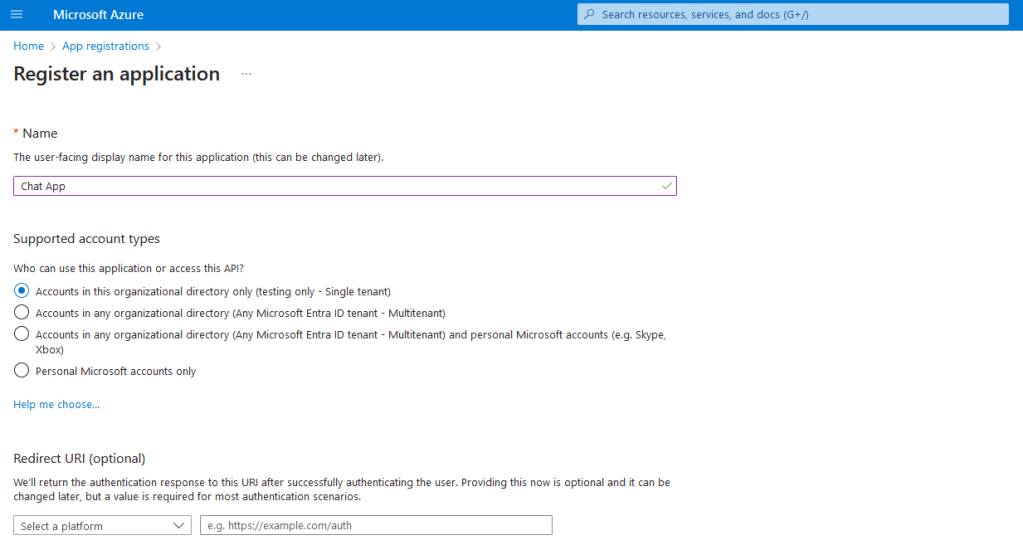
To set the scene for this persistence mechanism let’s start with a little bit of backstory. John, a normal user within the Contoso organization clicks on a phishing email and types in his username and password so he can get access to that sweet sweet $25 dollar Amazon gift card that was promised to him. The attacker then waits several hours and logs into the Azure portal using John’s credentials. The attacker then goes in and creates a new application called “Chat App” within the Contoso Azure portal. While the attacker is glad to have access to John’s account, they want to spread out and see if they can find anyone who is a little higher up the food chain at Contoso. So, the attacker sends an Chat App invitation to John’s boss Darrell via John’s email and then sign’s out for the night. The next morning Darrel opens the invitation from “John” and is greeted with the below application consent page.
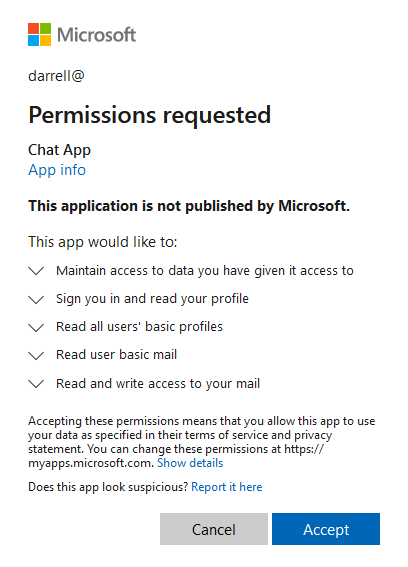
Darrell assumes that since this invitation came from John that it must be okay, so he clicks the “Accept” button and nothing seems to happen. Darrell assumes that it must not be working and he will check with John about it later. Meanwhile, as soon as Darrell clicked “Accept” the threat actors machine started immediately pulling down all of the email within Darrell’s mailbox. Unfortunately for Contoso, Darrell was keeping a copy of his password in his email.
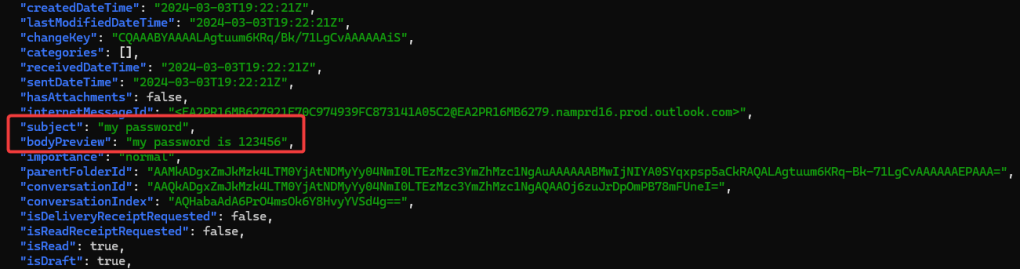
A quick details to note about the different applications that we have seen today. The Survey App used in the first example had an “Unverified” flag while the second Chat App did not. This is because the Chat App was created in the same tenant that both John and Darrell were apart of. This is the reason that the attacker was able to download all of Darrell’s email as well, since they were not limited in the permissions that they could request from Darrell.
Prevention Steps
- Prevent Users from Consenting to Unverified Applications
- Go to Entra ID > Users > User Settings and turn off “Users can register applications”
- This will prevent the creation of applications within a tenant shown in John’s compromise
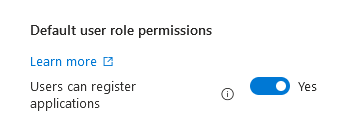
- Restrict user’s ability to consent to applications
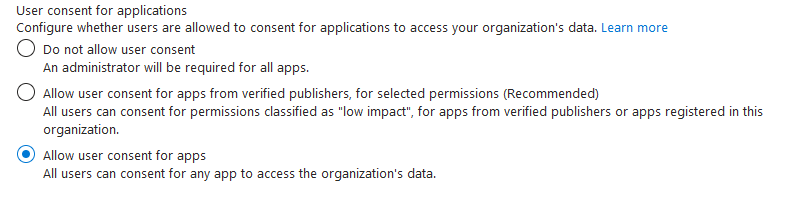
- Go to Entra ID > Enterprise Applications > Consent and Permissions and choose either “Do not allow user consent” or “Allow user consent for apps from verified publishes”
- This will prevent the scraping of all Entra users as we saw in Tina’s example.
As always feel free to put in a suggestion if there is anything inaccurate about this post. I have seen that group owners may also have the ability to consent to applications on behalf of their entire group which is another interesting attack path but I have not had time to look into that yet. Hope you were able to learn something and have a great week!
 Welcome Everyone!