As with most C2 frameworks, when Havoc first came out the payload was considered FUD (fully undetectable) at least for Windows Defender. As with any new piece of malware, as time goes on AV vendors learn about new tools and write detections for them. At the time of this writing the default Havoc payload will be immediately picked up by Windows Defender. This blog will attempt to get past these detections and provide us with a payload that will run without detection by Windows Defender.
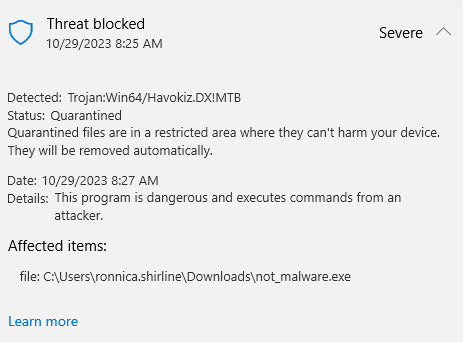
I am going to break this down into a few different chunks so we can tackle each one step by step. The first step will be to get the payload onto the machine in a method that does not immediately get whacked by Defender. I will be using the default payload from Havoc and start by changing the way that we deliver the payload to the victim machine.
- My first attempt was to put the default payload into an .img file and have the user download that. This was unsuccessful and got killed by Defender immediately.
- Next I tried a .zip file which also failed.
- Annnnnnddd same goes for a .iso
I am starting to think that I am going about this the wrong way. Let’s try and modify the payload and then find a way to get it onto the machine later.
My next thought was to encrypt the payload and see if that would allow us to get past Defender. Spoiler alert… it did not. However, this time we got a different detection which is interesting. This one was detected as a Meterpreter payload as seen below.
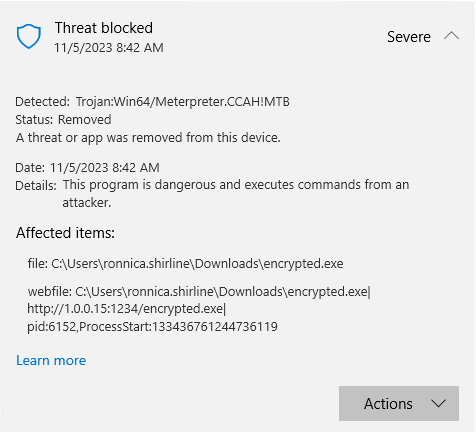
It looks like we will have to dive a little deeper if we want to get this payload past Defender.
After roughly six straight hours of chasing down functions, running threatchecker and editing EXE’s I have effectively made zero progress in the quest for a fud Havoc beacon. Next I am going to be looking into the signatures that Defender is using to trigger alerts and see if that will give me any insight into how we can bypass Defender.
Note: The following paragraph is not enough to bypass defender with cloud protection enabled. It only applies to the small percentage of signatures that are stored locally on the machine.
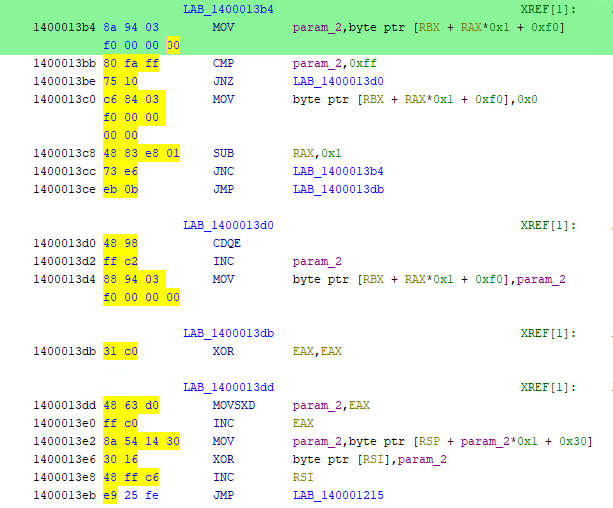
My next line of thinking was to find the database of signatures on the victim machine in order to find the specific Defender detections that were killing my Havoc agent. I found this github repo which allows us to decompress the VDM file that contains the static defender rules. Next I loaded the expanded database into HxD and saw that names of the rules exactly matched those shown in the above Defender alerts. Trojan:/Win64/Havokiz.DX!MTB is the name referenced in the expanded database and it is followed by a series of bytes that directly map to the Havoc beacon that I was running. The below screenshot is my Havoc beacon decompiled in Ghidra with the bytes highlighted that matched the defender database signature. Through trial and error I found a few bytes that I could change that would allow me to bypass all of the rules that Defender was using to flag my Havoc agent. Finally I had an agent that was undetected by Defender! That is until I turned the cloud delivered protection back on and killed my agent on sight. Back to the drawing board again…
Now, having just suffered a heartbreaking defeat after what I thought was a huge amount of progress I decided to change up my methodology. So far I had spent a ton of time trying to get an EXE file past Defender and had been entirely neglecting all of the other payload options that Havoc has to offer. After some researching I stumbled upon this beautiful blog post by thec0nci3rge which referenced inline C# compilation via Powershell. Now, I can not write C# code but I can follow a walkthrough and thec0nci3rge’s post gave step by step guide on how to generate and format the code needed for our payload (just go read that blog, it will explain this better than I can). However, since I am attempting to simulate a red team engagement I was looking for something that would be a little easier than having a user run a Powershell script. How about a dropper! For those that do not know, a dropper is a simple non-malicious looking program that will usually download or “drop” a more malicious file into memory (preferred) or onto disk. I decided to write my dropper as a VBS file since that is what I am most familiar with and it is pretty simple. So, I have my shell code for my Havoc agent written into y C# code in a file named inline-c-sharp.ps1. I then have a .VBS file named dropper.vbs. The dropper.vbs file will spawn a Powershell process and download our inline-c-sharp.ps1 file from our Kali machine (should probably be hosted somewhere else like the Havoc team server but this was a proof of concept at this point). Once the script VBS script has downloaded the inline-c-sharp.ps1 file from our attacking machine it will pipe the contents of the ps1 file into memory using the invoke-expression function (iex).

The dropper.vbs file will not be flagged by Defender, and the in memory execution will allow us to run our Havoc agent without any problems.
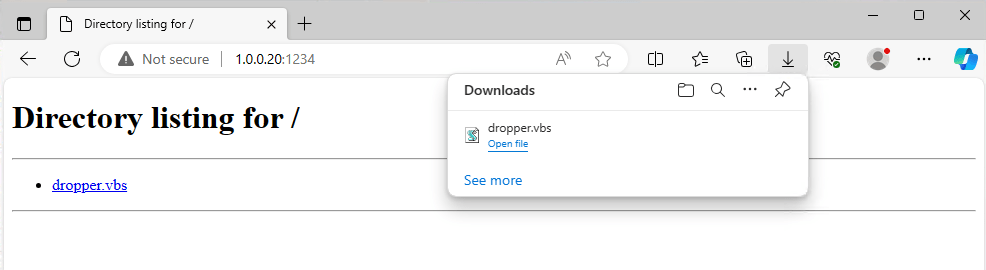
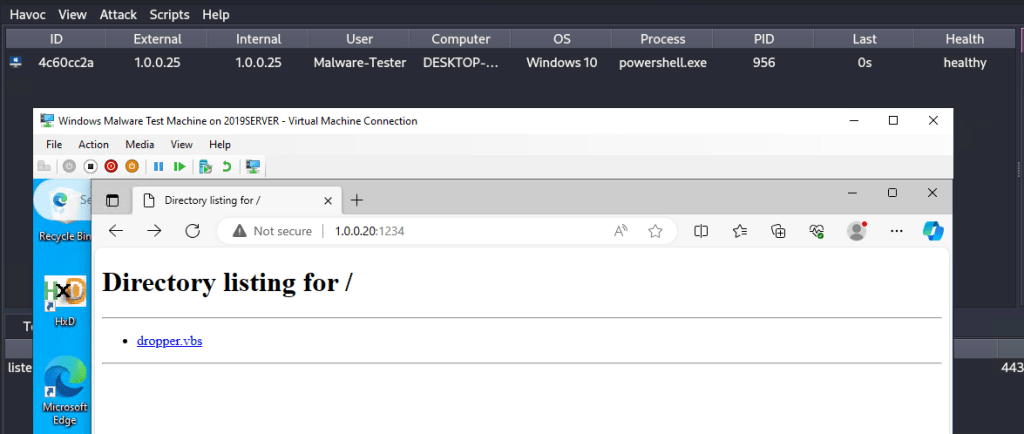
Finally! We have a Havoc beacon that will not get killed by Defender. From this point on we should be pretty much home free since there is no EDR running on this machine. In the event that we want to establish some method of persistence we can create a basic scheduled task as shown below (the /RL HIGHEST flag is only helpful if the user initially ran our payload as admin).

Anyways, thanks for coming on this Defender evasion journey with me. I think my next topic will be bypassing UAC.
 Welcome Everyone!